 FYOS
FYOS06 · C++ · CUDA · v1.1.0 · MIT
FastLocalExperts
An 89 GB language model at about 90 tokens per second on a single 32 GB graphics card.
- tokens per second when decoding
- ~90
- as fast as upstream llama.cpp – same file, same card
- 2,49×
- FLE-IQ3_M instead of 93.68 GB, KLD within noise
- 88,87 GB
How does an 89 GB model run on a 32 GB card?
Attention, shared weights and a cache of the most-used experts live in VRAM; the rest waits in RAM. When a token hits a cached expert the GPU computes it; when it misses, the CPU computes at the same time. The model’s MTP head drafts several tokens and the main model checks them in one pass. That makes about 90 tokens per second — local, no cloud.
What it is
FLE is a llama.cpp fork for large Mixture-of-Experts models on one GPU plus CPU experts. Attention, shared weights and a cache of hot experts live on the GPU, most of the experts stay in system RAM. FLE powers Rhea, the local language model behind FYOS: Qwen3.8-Flash-Next with 512 experts per layer.
What it does
- GPU expert cache with a global byte budget and a warm-start profile: a restarted server is warm right away.
- Overlap. Cache hits run on the GPU while misses run on the CPU at the same time.
- Speculative decoding with the model’s own MTP head, a restricted draft vocabulary and adaptive draft length.
- Four quantizations on Hugging Face: FLE-IQ3_M, FLE-IQ3_XXS, FLE-IQ2_M and FLE-IQ3_M-REAP448 (448 of 512 experts).
- 6,130 measurements. Every speed number from paired brackets; what did not work is in the report just the same.
Making Rhea Fast
Eight short films about the measurements behind FLE. Where a film and the report differ, the report is the reference.
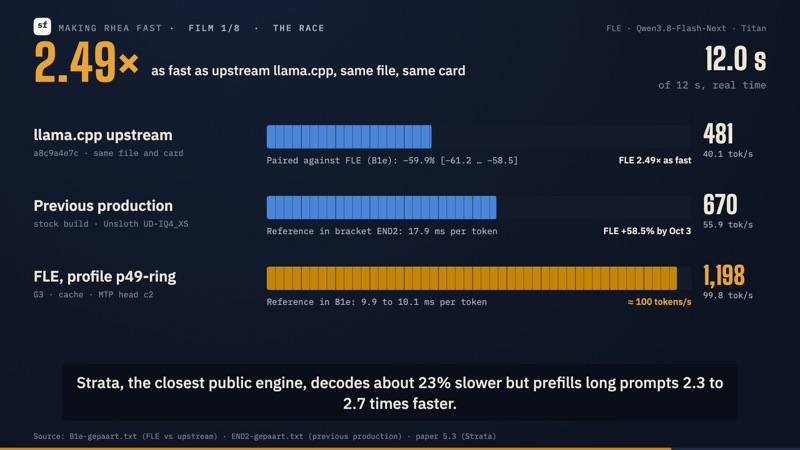 0:33 1/8 The Race
 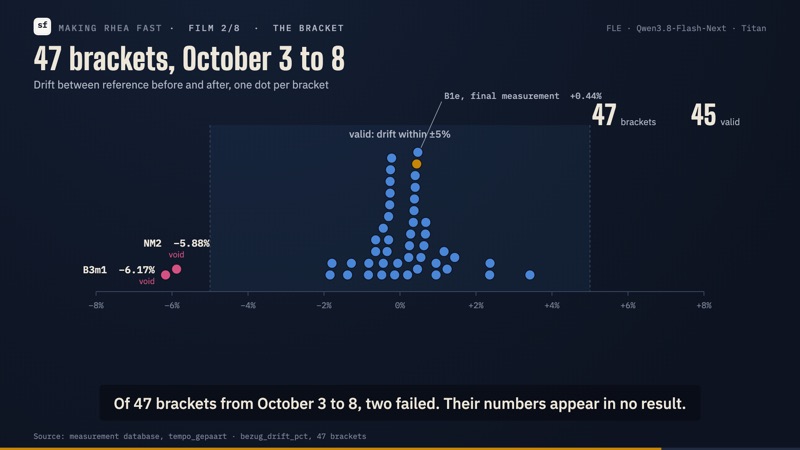 0:34 2/8 The Bracket
 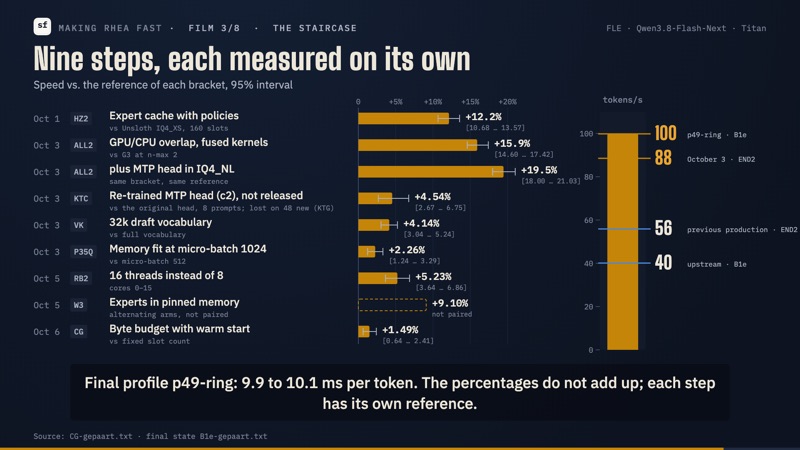 1:03 3/8 The Staircase
 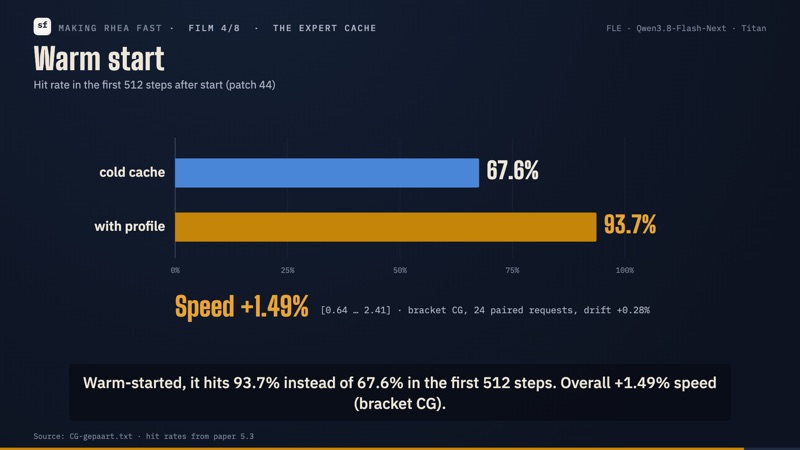 0:59 4/8 The Expert Cache
 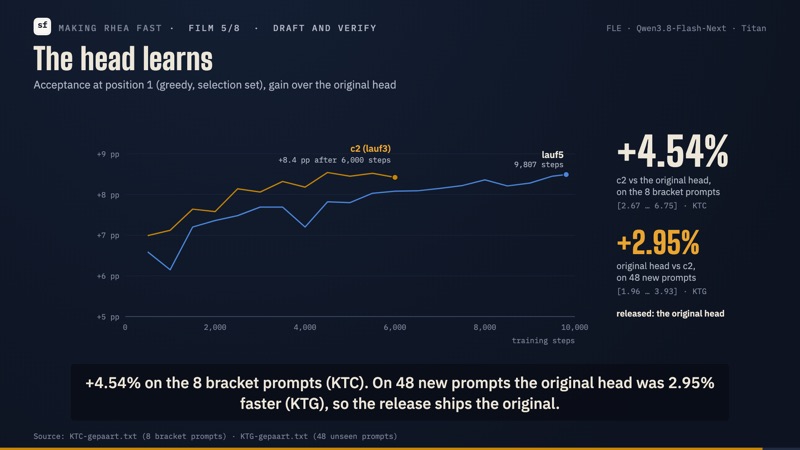 1:00 5/8 Draft and Verify
 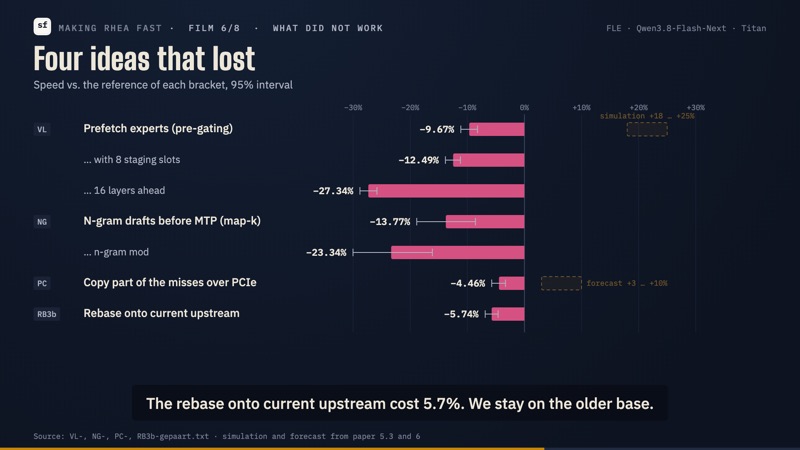 0:56 6/8 What Did Not Work
 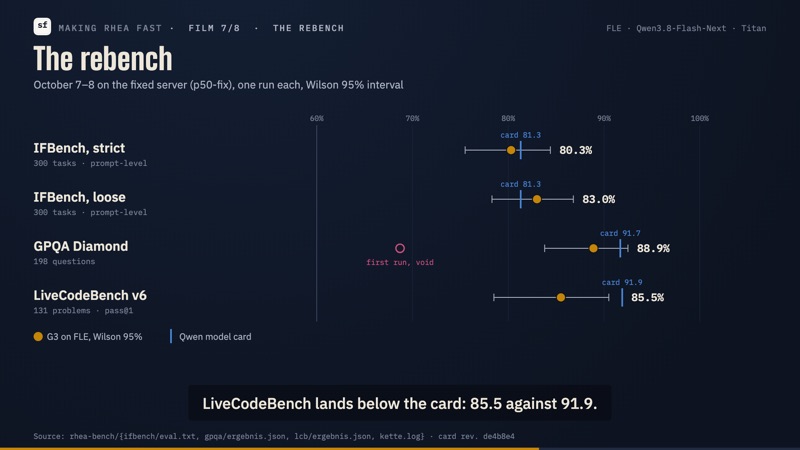 0:58 7/8 The Rebench
  0:58 8/8 Why We Do This
 All eight as one film (6:59) ↗ Playlist on YouTube ↗ English, subtitles burned in. Links go to YouTube.
Get started
$ git clone https://github.com/sirfyyn/FastLocalExperts
$ cmake -B build -DGGML_CUDA=ON -DCMAKE_BUILD_TYPE=Release
$ cmake --build build --config Release -j
All numbers hold for the machine (one 32 GB GPU, 120 GB RAM, 16 cores) and configuration named in the report. Technical Report ↗